How to Add your Stamps
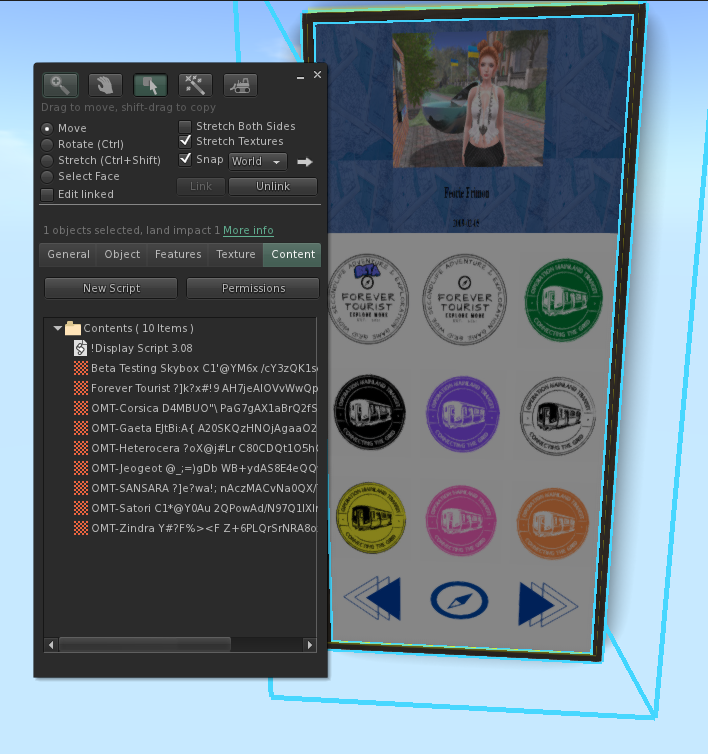
Using some basic Second Life editing skills, you can add your stamps (textures) to your Inworld Encounter Display.
Here’s how to do it! :)
Step 1: Start by REZZING OUT the Encounter Display. Make sure that your MEDIA is enabled on your Second Life viewer. When you rezz the Encounter Display, it will say a ‘link’ on Local Chat - you don’t need to click it or do anything.
Step 2: RIGHT CLICK + EDIT the Encounter Display, and then click the CONTENT TAB of the Object details.
Step 3: DRAG your collected stamp (texture) from your inventory to the CONTENT TAB of the Encounter Display.
Step 4: It may take a moment for your Encounter Display to update - I’ve even had to wait up to a minute or two. You will eventually notice that the display will show your collected stamps/textures on the display after a few moments. Try clicking the arrows if you feel like it’s been too long.
NOTE: You might notice some chatter on your Local Chat if you’ve added stamps that you’ve made yourself, etc. While you are welcome to add whatever textures you’d like, Stamps that you have created yourself won’t count towards the ‘Top 10 Explorers’ Leaderboard.